This post is a guest blog post by Ilya Mirman, former VP of Marketing at VMTurbo, CilkArts (acquired by Intel), Interactive SuperComputing (acquired by Microsoft) and SolidWorks Corporation. Ilya is currently an advisor to many startups in the Boston area.
I was 9 years old when my father taught me how to estimate the height of a building using my thumb and simple geometry. As engineers we are taught estimating techniques – in school, and by colleagues and mentors. Quick-and-dirty assessments are indispensable as we engineer new products, and they’re just as critical for product managers exploring new markets and products.
Being able to quickly size a market is quite handy at several points in a product’s life cycle. I am not talking about achieving the third decimal point of accuracy at a 95% confidence level; rather, I am talking about being able to know within, say, a factor of two or four what the opportunity might be. Here’s just a few of the situations I’ve seen where roughly sizing an opportunity helped lead to a better decision:
- What is the market opportunity for Product X? This is useful not just for go/no-go decisions, but also for what might be the right way to bring a product to market. For example, a line extension that can appeal to 15% of your existing user base might be a very attractive new add-on for your company to introduce; though it may not, for example, warrant a spin-out or significant engineering diversion.
- What is the right funding and development path for New Idea X? A new idea may be worthwhile, regardless of whether the opportunity it represents is $5M, $50M, or $500M. But it sure might be helpful to have a clue as to which it might be! If it’s $5M, it might be an interesting lifestyle business; if it’s $50M, it might be an interesting company for a couple angel investors to help get off the ground; whereas at $500M and up, it may be worthy of a venture capital investment and more aggressive development and go-to-market plans.
- Which user persona to target for the first release of Product X? Often, a product might appeal to a couple different user types. But rather than engineering the “gray sneaker” (when half the users actually want black, and the other half want white), it may be better to figure out which segment represents a better opportunity, and really optimize the product for them.
There’s no one “right” way to do market sizing, and in fact it’s often useful to triangulate using multiple approaches, to increase your confidence that you’re in the ballpark. Here’s a couple examples.
Top-Down: The Filter Approach
The approach here is to identify a key metric that’s driving the opportunity, and the key assumptions / reduction filters to zero in on your addressable market. One of my start-ups was Interactive Supercomputing (a venture-backed MIT spin-off acquired by Microsoft). Our software connected engineering desktop applications – such as MATLAB® or Python – and parallel servers, to solve large and complex numerical problems that can’t be solved with a desktop computer.
The market for high performance computers (also known as “HPC servers,” or “parallel servers”) was large and reasonably well-known – hundreds of thousands of servers sold annually. There is a broad set of diverse applications and usage scenarios for HPCs, so the big question for us was, how many of them could benefit from our software? Here are the three primary filters we identified:
- Fraction of servers to run custom applications: The software running on these servers falls into 2 categories: it is either an existing software application; OR it is a newly developed application, currently being prototyped on a desktop tool. Our software was suited for the latter scenario (enabling a much quicker path going from desktop prototype to deployment on a server). Our research suggested that roughly half the servers purchased every year were for running existing apps, and half were for custom apps. This 50% was therefore a constant filter in our model.

- Desktop Language Support: The first filter helps us identify the servers running new custom apps. But that would be an overestimate, because our software was not able to help every one of the custom app developers. Turns out that a second important filter is: which desktop tool or language is used to prototype the application. Our initial product supported MATLAB, which according to our research was used to prototype ~25% of the custom HPC apps. Over the following 3 years, we planned on introducing support for Python and R, expanding the addressable market to 50% of the custom HPC apps.
- Product fit: The third and final filter was product fit. Our software did not support all domains and applications equally well – for example, we were great for signal processing, but not genetic algorithms. We broke down the numerical methods into about 10 domains, identified our sweet spots, guesstimated which ones we’ll strengthen over time, and felt that a reasonable model might be to grow this filter from 25% to 40% over 4 years.
Here’s the resulting model – we start from the universe of servers sold in the HPC space, and zero in on the footprint of ones we can address well. Because two of the filters grow over time, as does the absolute number of servers shipped, the market grows rapidly: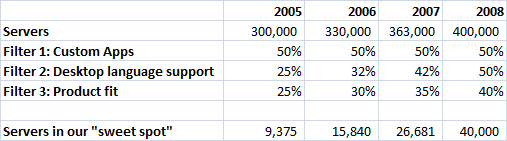
(Note: I’m glossing over a couple details here, for clarity. First is the connection between number of servers and the dollars spent. And second, the fact that in addition to new servers modeled here, there is an installed base which is approximately 3 times larger, though less of them are available for new custom applications, and are typically not being sold to by the channel we were betting on.)
Bottom-Up Estimate
In the bottom-up approach, rather than starting with some total and filtering it to the relevant fraction, we do a bit of the opposite: identify the segments, to build up the total market opportunity.
At my next start-up Cilk Arts (a venture-backed MIT spin-off acquired by Intel), our mission was to provide the easiest, quickest, and most reliable way to optimize application performance on multicore processors. Our software consisted of developer tools, and a runtime system. We had hundreds of conversations with a broad set of organizations looking to make their applications run faster on the new generation of microprocessors from Intel and AMD. We saw a large variety in terms of product fit, how many applications they develop, size of their user base, and what they may spend.
So to size the market, we identified the key segments, and estimated the key variables:
- Number of firms in each segment: through web searches and other data we actually compiled a list of many of these;
- Number of apps developed per year;
- Product fit: Fraction of their apps we could accelerate (we had better performance in some sectors, and less of a fit for others);
- Estimate of value for each app based on conversations with hundreds of prospects.

My sense is that it was less important to know whether $480M was “right” and more important to quickly figure out that it was neither a billion-dollar opportunity, nor merely a $100M market (where the leader might garner a ~20% share).
Conclusion
Because there is no one source of info is that reliable or complete, it’s better to use multiple approaches to zero in on a good estimate. Try to identify metrics that correlate with usage or size of the problem – possible sources of data include government databases, relevant publications’ reader studies, commercial databases, competitors.
What approaches have YOU used to estimate market opportunity? We’d love to hear from you.








 Software Product Manager by Gopal Shenoy